![TEA with tag.svg]](https://help.theemployeeapp.com/hubfs/TEA%20with%20tag.svg)
Introduction
Marissa is theEMPLOYEEapp’s built-in AI assistant that helps employees and admins instant access to platform information, newsfeed content (if enabled), and organizational resources. Marissa retrieves information directly from platform data and admin-uploaded documents, such as policies, guidelines, and handbooks, to provide fast, accurate, and cited answers.
With Marissa, employees and HR teams save time by finding what they need instantly, without searching through documents or waiting for support.
Simplify daily HR activities
Marissa improves HR efficiency by:
- Answering common questions about leave policies, benefits, and working hours.
- Directing employees to the right resources.
- Reducing repetitive queries for HR teams.
- Ensuring employees always access the latest HR information.
Key functionalities of Ask Marissa
- Guides platform usage: Marissa responds to questions about navigation and how features work within theEMPLOYEEapp. It cites the source and interprets the roles and permissions defined in the help documents to provide accurate, role-appropriate information.
- Searches content across the platform: If enabled, Marissa helps you find posts in the newsfeed based on titles or captions.
- Uses organizational documents to answer questions: Marissa references documents such as SOPs, safety policies, HR policies, and other admin-uploaded resources to generate accurate, cited responses while considering roles and permissions.
📒Notes:
- Marissa can access information only from resources that admins enable it to read, and it does not process or interpret image-based content.
- In the content form, content creators can select “Send to Marissa”, which allows Marissa to read the existing resources. The same applies when they create new content.
- Accessible to employees and admins: Both employees and admins can use Marissa and benefit from these core capabilities.
To access Marissa: Click Ask Marissa at the top-right of the platform.
Enable Marissa AI
Only account admins enable Marissa AI for the organization.
Navigate to Settings > Marissa AI.
- Toggle the option at the top right to enable Marissa AI.

- When Marissa is enabled, account admins and app profile admins can add resources to it and manage the ones they upload.
- When Marissa is disabled, account admins can view and download all existing resources, while app profile admins can view and download only the resources they uploaded.
Add training resources
Admins configure Marissa by uploading resources such as policies, handbooks, and guidelines. This helps Marissa answer employee questions accurately and provide citations.
📒Note: Account admins can add resources for all app profiles across the organization. App profile admins can add resources only for the app profiles where they have admin access.
Navigate to Settings > Marissa AI.
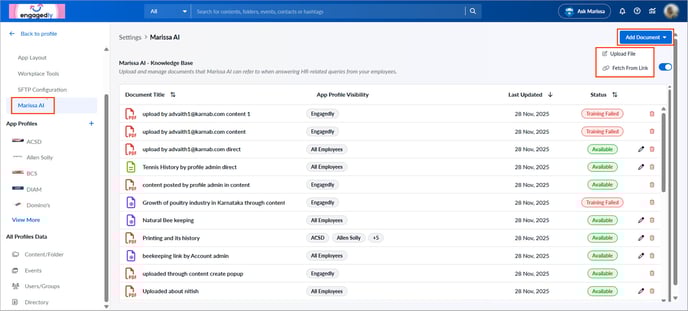
- Click Add Document at the top right.
- Choose one of the following:
- Upload File: Enter a title, select the app profile, click Browse, upload the file, and click Add.
- Fetch From Link: Enter a title, description, and a public URL, and click Add.
📒Note: Add only public URLs that do not require login. Marissa cannot access restricted content.
If the upload is successful, the status shows “Available”. If it fails, the status shows “Training Failed”.
Manage training resources
After adding training resources, you can manage them if required. Account admins manage resources uploaded by app profile admins while app profile admins manage only the resources they upload.
- Click the Pen
 icon to edit or the Delete
  icon to remove a resource.
⚠️Warning: Deleting a resource permanently removes it from Marissa’s memory.
📒Note: You cannot manage documents uploaded through the “Add Content” page.