![TEA with tag.svg]](https://help.theemployeeapp.com/hubfs/TEA%20with%20tag.svg)
Learners can explore and self-enroll in learning available in the library, including the recommended courses. After enrolling, they can unenroll from learning at any time.
Self-enroll
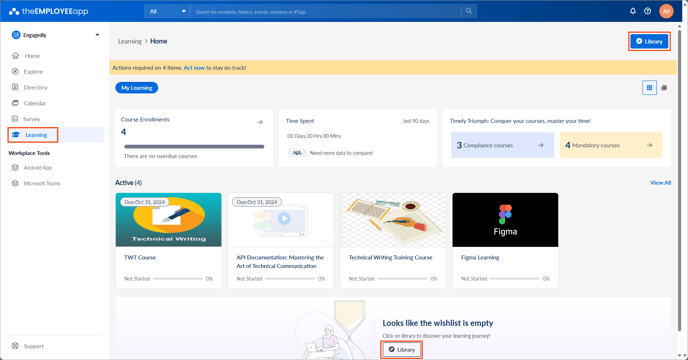
Navigate to Learning on the left pane.
The My Learning tab allows you to view learnings you are assigned to or enrolled in the Active field.
- Perform one of the following options:
Option 1: Click Library at the top right to view the available learning in the library.
Option 2: Scroll down to find the Library option at the center of the screen.
Add learnings to your wishlist if you want to enroll at any time.
Filter learnings to explore them based on their type, level, rating, author, duration, and language.
2. Open a learning to view its details.
3. On the course details page, click Enroll.
Start a learning after you enroll in it.
Unenroll
After enrolling in a learning, unenroll from it at any time if required.
📒Note: You cannot unenroll from a learning that is assigned to you.
- In the Active field, select a learning you want to unenroll from.
- Click the Overflow
 Menu at the top right, select Unenroll, and then click Confirm.