![TEA with tag.svg]](https://help.theemployeeapp.com/hubfs/TEA%20with%20tag.svg)
Authors can assign learning to learners after publishing it, selecting members and groups as required. While assigning, authors can set the due date for a course, edit the due date, or remove it at any time. They can also mark the assignment as mandatory, making it a required training that learners must complete.
On the course details page, the Insights tab appears beside the Learners tab only after assigning learning.
Navigate to Learning on the left pane.
- At the top right, click Manage Resources.
- Click Authored by you and select a learning.
- On the course details page, click Assign and select Assign to Members or Assign to Groups as required.
Assign to members
Assign learning to any employee of the organization.
4. Follow steps 1 to 3.
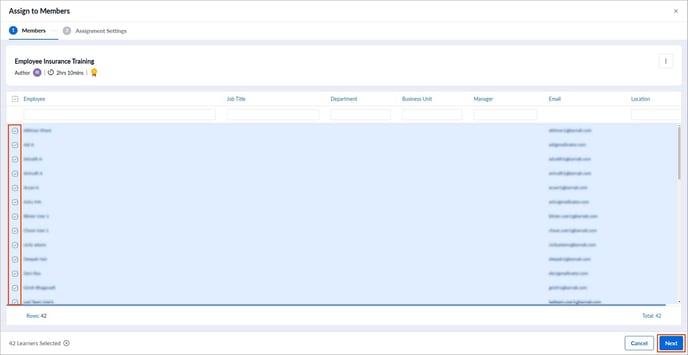
5. Select the employees manually or in bulk and click Next.
- Toggle the Set due date option to enable or disable it.
- Toggle the Mark Assignment as Mandatory option if required.
📒Note: You cannot set a due date and mark the assignment mandatory for a compliance course.
7. Click Assign.
Assign to groups
Assign learning to the specific groups created in your organization.
4. Follow steps 1 to 3.
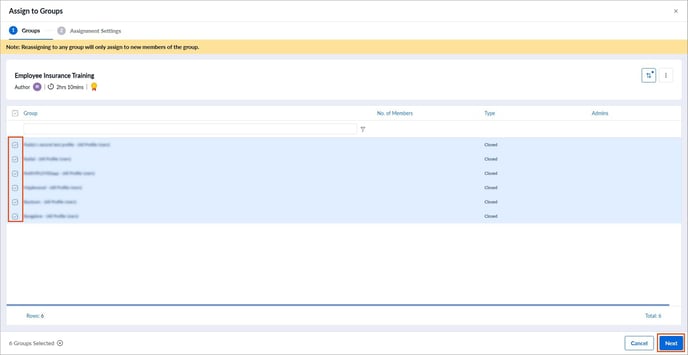
5. Select the employees manually or in bulk and click Next.
6. In the Assignment Settings tab,
- Toggle the Set due date option to enable or disable it.
- Toggle the Mark Assignment as Mandatory option if required.
📒Note: You cannot set a due date and mark the assignment mandatory for a compliance course.
7. Click Assign.
Edit or remove due date
After setting the due date for a course, you can edit or remove it for the individual learners at any time.
3. Follow steps 1 and 2.
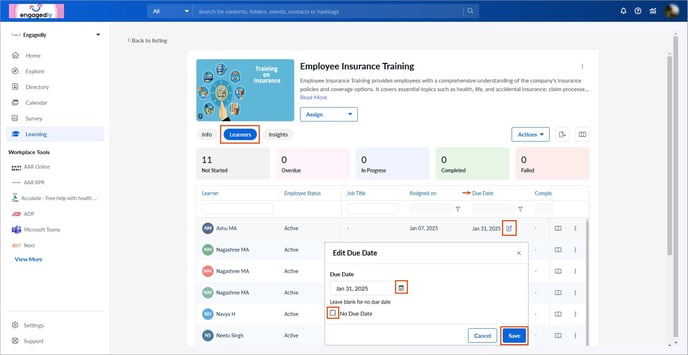
4. Go to the Learners tab, hover over the Due Date field, and click the Edit  Icon for a learner.
5. Click the Calendar  Icon to edit the due date or enable the option No Due Date to remove it, and click Save.
📒Note: You cannot view the due date for a compliance course.